顯示具有 Java 標籤的文章。 顯示所有文章

2011年9月2日 星期五

[Java] How to check if a directory is not empty?

This is a example to demo how to check if a directory is not empty?

package org.kodejava.example.io;

import java.io.File;

public class EmptyDirCheck {
    public static void main(String[] args) {
        File file = new File("/home/username/data");

        //
        // Check to see if the object represent a directory.
        //
        if (file.isDirectory()) {
            //
            // Get list of file in the directory. When its length is not zero
            // the folder is not empty.
            //
            String[] files = file.list();

            if (files.length > 0) {
                System.out.println("The " + file.getPath() + " is not empty!");
            }
        }
    }
}

Reference:

2011年6月2日 星期四

[Java] function如何傳不定參數

private void MyParameterizedFunction(String param1, int param2, Boolean... params) {
    assert params.length <= 1;
    boolean param3 = params.length > 0 ? params[0].booleanValue() : false;
}
 
private void test()
{
    MyParameterizedFunction("", 1);
}

Reference:

2011年5月5日 星期四

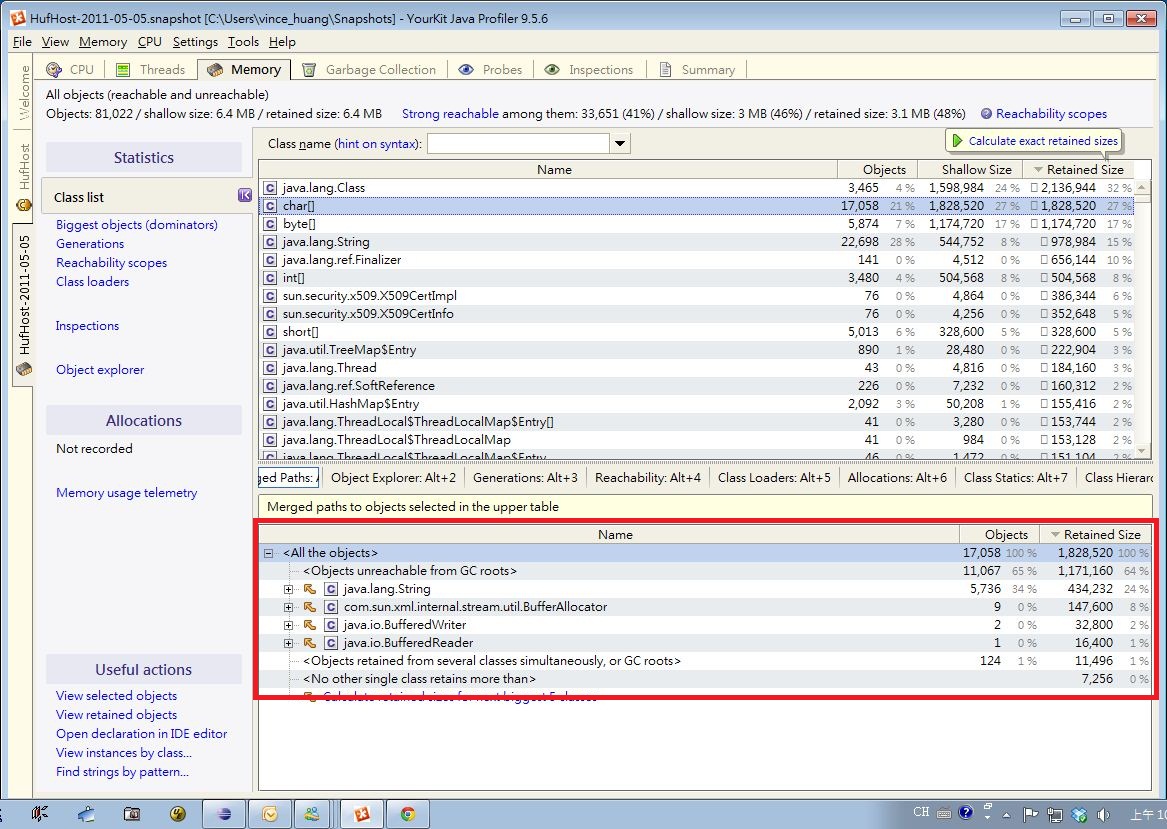
[Java] 用YourKit看Java程式的CPU & Memory

YourKit
Step 1: Select monitor application
  • Launch your eclipse and YourKit.
  • Run your code.
  • Your will see your eclipse and running process on YourKit.

Step 2: Capture Memory Snapshot
  • Click Capture Memory Snapshot to see memory usage in detail.
  • Launch your eclipse and YourKit.


Step 3: Memory Statistics
  • You will see memory statistics.
  • For example, if you want to see who use char[], we can click "Click to start calculation"

Step 4: Do Memory Calculation
  • You can see who use this object (ex: char[]).

Step 5: Object Explore
  • You can use "Object Explore" to see data in memory.


Step 6: Paths of GC roots
  • In Memory Statistics, right click class (ex: char[])
  • Click "Paths of GC roots", you can see the GC status of this object.
References

2011年4月29日 星期五

[Java] What is an interface in Java

Java Interface:
1. 由於Java沒有Class多重繼承,為了讓物件具有多種型態,可以用Interface(介面)的達到多重繼承的需求。
2. 介面方法宣告預設都是"public",有沒有加public預設仍是public。
3. 介面宣告預設都是abstract,有沒有加abstract預設仍是abstract。
4. 當定義類別時,可以使用"implements"關鍵字來指定要實作哪個介面,介面中所有定義的方法都要實作。
5. 由於介面中的方法預設都是public,所以實作介面的類別中,方法必須宣告為public,否則無法通過編譯。


public interface IRequest {
  public abstract void execute(); // 可以用 void execute(); 省略public或abstract,其意義相同。
} 

public class HelloRequest implements IRequest {
  private String name;
  public HelloRequest(String name) 
  {
    this.name = name;
  }

  public void execute() {
    System.out.printf("Hello! %s!%n", name);
  }
} 

實作多個介面的方式: 

public class 類別名稱 implements 介面1, 介面2, 介面3 { 
    // 介面實作 
}

介面進行繼承的方式: 

public interface 名稱 extends 介面1, 介面2 { 
    // ... 
} 


References:

2011年4月22日 星期五

[Java] ThreadPoolExecutor

一個任務通過execute(Runnable)方法被加入到執行緒池,任務就是一個Runnable類型的物件,任務的執行方法就是Runnable類型物件的run()方法。

當一個任務通過execute(Runnable)方法欲加入到執行緒池時:

  • 如果此時執行緒池中的數量小於corePoolSize,即使執行緒池中的執行緒都處於空閒狀態,也要新增新的執行緒來處理被加入的任務。
  • 如果此時執行緒池中的數量等於 corePoolSize,但是緩衝佇列 workQueue未滿,那麼任務被放入緩衝佇列。
  • 如果此時執行緒池中的數量大於corePoolSize,緩衝佇列workQueue滿,並且執行緒池中的數量小於maximumPoolSize,建新的執行緒來處理被添加的任務。
  • 如果此時執行緒池中的數量大於corePoolSize,緩衝佇列workQueue滿,並且執行緒池中的數量等於maximumPoolSize,那麼通過 handler所指定的策略來處理此任務。

也就是說處理任務的優先順序為:
  • 核心執行緒corePoolSize、任務佇列workQueue、最大執行緒maximumPoolSize,如果三者都滿了,使用handler處理被拒絕的任務。
  • 當執行緒池中的執行緒數量大於 corePoolSize時,如果某執行緒閒置時間超過keepAliveTime,執行緒將被終止。這樣,執行緒池可以動態的調整池中的執行緒數。
unit可選的參數為java.util.concurrent.TimeUnit中的幾個靜態屬性:
  • NANOSECONDS
  • MICROSECONDS
  • MILLISECONDS
  • SECONDS。

workQueue常用的是:
  • java.util.concurrent.ArrayBlockingQueue

handler有四個選擇:
  • ThreadPoolExecutor.AbortPolicy():丟出java.util.concurrent.RejectedExecutionException異常
  • ThreadPoolExecutor.CallerRunsPolicy():重試加入當前的任務,他會自動重複調用execute()方法
  • ThreadPoolExecutor.DiscardOldestPolicy():放棄最舊的任務
  • ThreadPoolExecutor.DiscardPolicy():放棄當前的任務

Constructor: Creates a new ThreadPoolExecutor with the given initial parameters and default thread factory and handler.

ThreadPoolExecutor(int corePoolSize, int maximumPoolSize, long keepAliveTime, TimeUnit unit, BlockingQueue workQueue)


核心執行緒池大小(corePoolSize)
  • 池中所保存的執行緒數,包括空閒執行緒。
最大執行緒池大小(maximumPoolSize)
  • maximumPoolSize - 池中允許的最大執行緒數。
工作存活時間(KeepAliveTime)
  • keepAliveTime - 當執行緒數大於核心時,此為終止前多餘的空閒執行緒等待新任務的最長時間。
工作存活時間(unit)
  • unit - keepAliveTime 參數的時間單位。
工作佇列(workQueue)
  • workQueue - 執行前用於保持任務的佇列。此佇列僅保持由 execute 方法提交的 Runnable 任務。
import java.util.concurrent.*;
import java.util.*;
 
class MyThreadPoolExecutor
{
    int poolSize = 2;
 
    int maxPoolSize = 2;
 
    long keepAliveTime = 10;
 
    ThreadPoolExecutor threadPool = null;
 
    final ArrayBlockingQueue queue = new ArrayBlockingQueue(
            5);
 
    public MyThreadPoolExecutor()
    {
        threadPool = new ThreadPoolExecutor(poolSize, maxPoolSize,
                keepAliveTime, TimeUnit.SECONDS, queue);
 
    }
 
    public void runTask(Runnable task)
    {
        // System.out.println("Task count.."+threadPool.getTaskCount() );
        // System.out.println("Queue Size before assigning the
        // task.."+queue.size() );
        threadPool.execute(task);
        // System.out.println("Queue Size after assigning the
        // task.."+queue.size() );
        // System.out.println("Pool Size after assigning the
        // task.."+threadPool.getActiveCount() );
        // System.out.println("Task count.."+threadPool.getTaskCount() );
        System.out.println("Task count.." + queue.size());
 
    }
 
    public void shutDown()
    {
        threadPool.shutdown();
    }
 
    public static void main(String args[])
    {
        MyThreadPoolExecutor mtpe = new MyThreadPoolExecutor();
        // start first one
        mtpe.runTask(new Runnable()
        {
            public void run()
            {
                for (int i = 0; i < 10; i++)
                {
                    try
                    {
                        System.out.println("First Task");
                        Thread.sleep(1000);
                    } catch (InterruptedException ie)
                    {
                    }
                }
            }
        });
        // start second one
        /*
         * try{ Thread.sleep(500); }catch(InterruptedException
         * ie){}
         */
        mtpe.runTask(new Runnable()
        {
            public void run()
            {
                for (int i = 0; i < 10; i++)
                {
                    try
                    {
                        System.out.println("Second Task");
                        Thread.sleep(1000);
                    } catch (InterruptedException ie)
                    {
                    }
                }
            }
        });
        // start third one
        /*
         * try{ Thread.sleep(500); }catch(InterruptedException
         * ie){}
         */
        mtpe.runTask(new Runnable()
        {
            public void run()
            {
                for (int i = 0; i < 10; i++)
                {
                    try
                    {
                        System.out.println("Third Task");
                        Thread.sleep(1000);
                    } catch (InterruptedException ie)
                    {
                    }
                }
            }
        });
        // start fourth one
        /*
         * try{ Thread.sleep(500); }catch(InterruptedException
         * ie){}
         */
        mtpe.runTask(new Runnable()
        {
            public void run()
            {
                for (int i = 0; i < 10; i++)
                {
                    try
                    {
                        System.out.println("Fourth Task");
                        Thread.sleep(1000);
                    } catch (InterruptedException ie)
                    {
                    }
                }
            }
        });
        // start fifth one
        /*
         * try{ Thread.sleep(500); }catch(InterruptedException
         * ie){}
         */
        mtpe.runTask(new Runnable()
        {
            public void run()
            {
                for (int i = 0; i < 10; i++)
                {
                    try
                    {
                        System.out.println("Fifth Task");
                        Thread.sleep(1000);
                    } catch (InterruptedException ie)
                    {
                    }
                }
            }
        });
        // start Sixth one
        /*
         * try{ Thread.sleep(500); }catch(InterruptedException
         * ie){}
         */
        mtpe.runTask(new Runnable()
        {
            public void run()
            {
                for (int i = 0; i < 10; i++)
                {
                    try
                    {
                        System.out.println("Sixth Task");
                        Thread.sleep(1000);
                    } catch (InterruptedException ie)
                    {
                    }
                }
            }
        });
        mtpe.shutDown();
    }
 
}
Reference:

2011年3月7日 星期一

[Java] JLint 文斯不負責報導

今天要介紹的是這套JLint(http://artho.com/jlint/)的工具

簡單來說,JLint是一個可以幫你分析你寫的Java程式碼的工具,包括語法(syntax)及語義(semantic)檢查,不一致性及同步問題等。其中AntiC.exe是負責語法檢查,JLint.exe是負責語義檢查。

快速入門(如果你只想知道如何用
  • 下載:到JLint官方網站下載(http://artho.com/jlint/download.shtml),我是下載Windows版 jlint-2.3.zip
  • 解壓縮:將jlint-2.3.zip解壓縮。如果你只是要使用JLint來檢查Java程式碼,你需要用到 jlint-2.3\jlintwin32\中的兩個執行檔(antic.exe和jlint.exe)就可以了。
  • 語法檢查:antic.exe src\*.java(ex: src為放java檔的folder),執行完antic.exe就可以看到結果輸出。
  • 語義檢查:jlint.exe src\*.java(ex: src為放java檔的folder),執行完jlint.exe就可以看到結果輸出。
細部講解(如果你想知道更詳細功能
  • AntiC能檢查的是
    • 字裡行間的蟲蟲戰爭(Bugs in tokens)
      • 跳離符號後數字必須是八進位數字。
      • 跳離符號後數字個數必須小於三個字元。
      • Unicode的跳離符號\u後接的是十六進位數字。
      • 跳離符號接了錯誤的字元(非八進位字元或Unicode)。
      •  少用Trigraph sequence(以??為前置字元的三字元序列)為妙。
      • 多字元的字元定義(char ch = 'ab';)是不一定可移植的。
      • 長整數定義時後置字元最好是大寫的L,小寫l會跟數字1混淆。
    • 運算子間的恩怨情仇(Operator priorities)
      • 運算子運算時最好有括號表示優先順序。
      • AND運算子優先權比OR運算子高。
      • 位元位移運算子優先權較低。
      • 邏輯中的等於是==而不是=。 
      • 指定運算子=具較低優先權。
      • 位元運算子具較低優先權。
    • 程式主體的誰是誰非(Statement body)
      • 迴圈中的程式碼最好用括號定義範圍。 
      • 邏輯IF的程式碼最好用括號定義範圍。
      • 邏輯ELSE的程式碼最好用括號定義範圍。
      • 條件邏輯SWITCH的程式碼最好用括號定義範圍。
      • 條件邏輯中的CASE或DEFAULT的程式碼最好用括號定義範圍。
      • 條件邏輯中的CASE或DEFAULT的程式碼不要忘了BREAK。

  • JLint能檢查的是
    • 同步(synchronization)
      • 死結(deadlock)
      • 競賽情況(Race Condition)
    • 繼承(inheritance)
      • 派生類別的方法名稱沒有正確覆蓋有相同名稱的基本類別的方法名稱
      • 派生類別中的元件名稱與基本類別元件名稱相同
      • 區域變數名稱與元件中全域變數名稱相同
      • 方法的finalize()未能Call到super.finalize()
    • 資料流程(data flow)
      • method的參數傳遞可能有null的情形
      • 變數的使用可能會有null的情形
      • 運算元可能會有null的情形,會有method的使用問題
      • 零個運算元的運算
      • 運算結果都為零
      • 位元位移計算超過位數(例如:int y >>= 32, 最最最最多只能shift 31位)
      • 位元位移計算超過範圍(例如:int x >>= 32 - (y & 31); // range of count is [1,32])
      • 變數值的轉換超出範圍(例如:int x = 100000; short s = x;)
      • 變數值的轉換會導致資料遺失(例如:數值範圍較大的變數轉換到數值範圍較小的變數)
      • 變數運算後的型態轉換會導致資料遺失(例如:兩個整數相乘)
      • 邏輯判斷恆為真(True)或假(False)
      • 只有當比較的運算元都為0時,邏輯判斷才會成立邏輯判斷邏輯判斷恆為真 邏輯判斷恆為真邏輯判斷恆為真 邏輯判斷恆為真邏輯判斷恆為真邏輯判斷恆為真邏輯判斷恆為真 最最最邏
      • 餘數運算恆等於第一個運算元
      • char與short比較
      • 字串比對誤用物件比對
      • 不等式的比較可以用等式的比較 替代
      • Switch中Case的值超出範圍


  • 更詳細地說明請看http://artho.com/jlint/manual.html
  • 2011年1月31日 星期一

    [Java] javac

    問題
    • 'javac' 不是內部或外部命令、可執行的程式或批次檔。
    解法
    • 在「我的電腦」按右鍵 <「內容」<「進階」<「環境變數」
    • 在系統變數那邊找到path,按「編輯」
    • 加上C:\Program Files\Java\jdk1.5.0_12\bin\

    2011年1月28日 星期五

    [Java] Performance Tuning

    Performance Tuning:

    • Know How:
      • Designing for Performance
        • Avoid Creating Objects.
          • Generally speaking, avoid creating short-term temporary objects if you can. Fewer objects created mean less-frequent garbage collection, which has a direct impact on user experience.
        • Performance Myths
          • It was cheaper to invoke methods on a HashMap map than a Map map,
        • Prefer Static Over Virtual
          • If you don't need to access an object's fields, make your method static. Invocations will be about 15%-20% faster. It's also good practice, because you can tell from the method signature that calling the method can't alter the object's state.
        • Use Static Final For Constants
          • We can improve matters with the "final" keyword: static final String strVal = "Hello, world!"; instead of static String strVal = "Hello, world!";
          • strVal will use a relatively inexpensive "string constant" instruction instead of a field lookup.
        • Use Enhanced For Loop Syntax
          • Algorithm Performance C > B > A. Ex: A. 在for loop用length. B. 不在for loop用length, 用local variable存length. C. 用Foo a : mArray.
        • Avoid Enums Where You Only Need Ints
        • Use Package Scope with Inner Classes
        • Use Floating-Point Judiciously
        • Know And Use The Libraries
          • Ex: String.indexOf
        • Use Native Methods Judiciously
      • Use StringBuilder to improve string editing performance.
      • 不再使用的物件要盡早設定為 null,以便早點被當成垃圾清掉。
      • Use global variable to reuse memory.
    • Reference:

    [Java] While loop, For loop and Iterator Performance Test

    http://www.mkyong.com/java/while-loop-for-loop-and-iterator-performance-test-java/

    結論是While loop, For loop 比 Iterator Performance好很多